
Download Json Formatter Pro – Free JSON Formatter for Windows, Mac & Android | Secure JSON Editor & Viewer
Why Json Formatter Pro Stands Out Among JSON Tools
Json Formatter Pro is a robust, user-friendly software designed specifically for developers, web designers, and data analysts who work with JSON (JavaScript Object Notation) on a daily basis. Unlike basic online tools, this desktop application offers a secure, offline environment to handle sensitive data without exposing it to third-party servers. Whether you're debugging API responses, organizing configuration files, or preparing data for web integration, Json Formatter Pro delivers a seamless experience across Windows, Mac, and Android platforms.
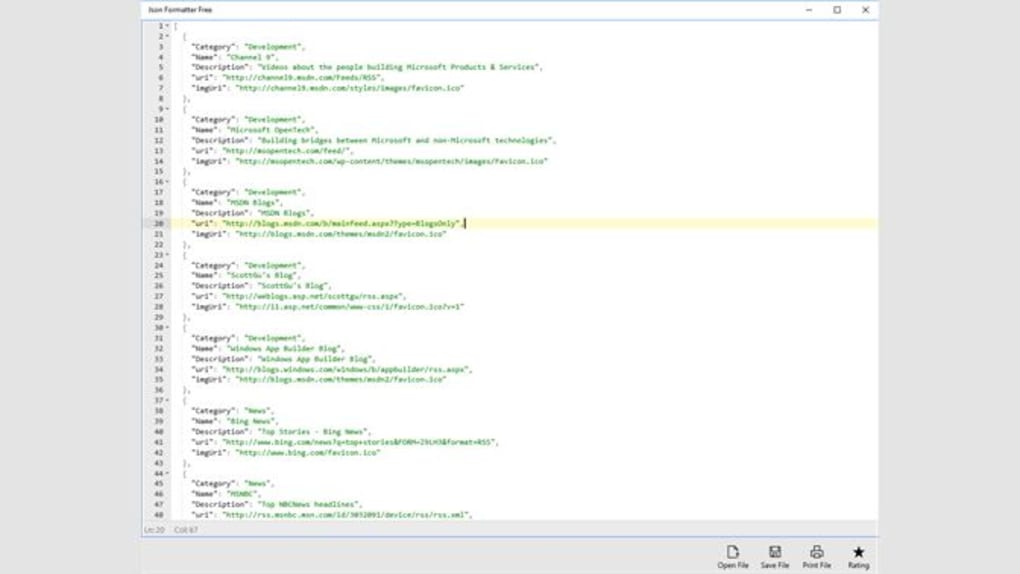
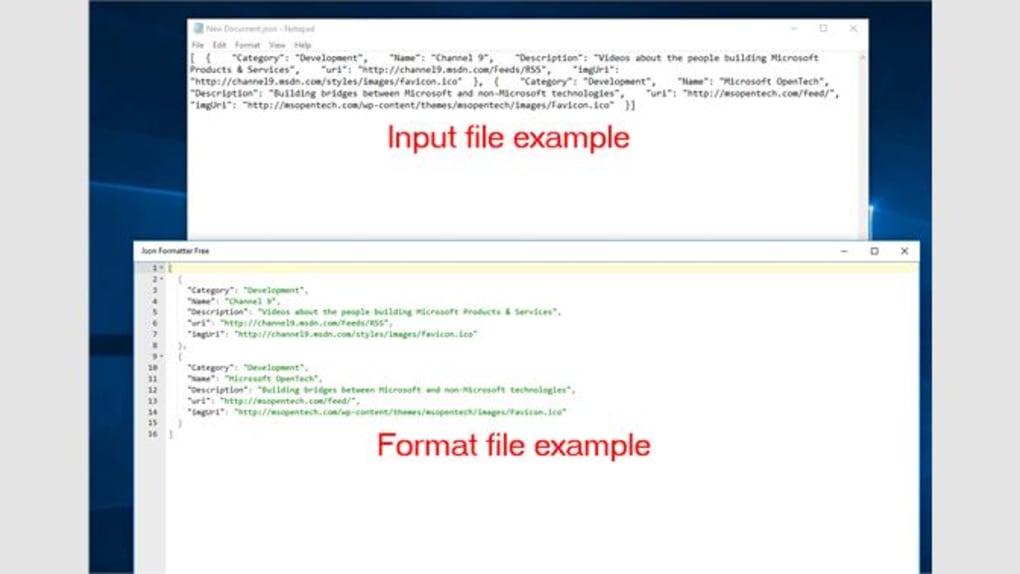
One of the standout features is its ability to instantly format and beautify raw JSON code with just a few clicks. The tool intelligently indents nested structures, corrects spacing, and highlights syntax errors in real time—making it a must-have for anyone who deals with complex JSON objects. The interface is clean and intuitive, ensuring that even beginners can navigate it effortlessly. You don’t need to memorize commands or rely on command-line tools; everything is accessible through a simple, drag-and-drop interface.
Moreover, Json Formatter Pro supports live validation, which helps detect malformed JSON before it causes runtime issues. This is particularly useful when working with APIs or integrating data from external sources. The app also allows you to collapse or expand sections of your JSON tree, enabling quick navigation through large datasets. With support for file import/export, multiple encoding formats, and customizable themes, Json Formatter Pro isn’t just a formatter—it’s a full-featured JSON editor and viewer that enhances productivity and reduces errors.
Key Features That Make Json Formatter Pro a Developer’s Best Friend
- Instant JSON Beautification – Automatically formats unstructured JSON into a clean, readable layout with proper indentation and spacing.
- Real-Time Syntax Validation – Highlights malformed JSON with color-coded alerts and provides suggestions for correction.
- Multi-Platform Support – Available for Windows, Mac, and Android, ensuring consistency across devices.
- File Import & Export – Import JSON files from local storage or clipboard, and export them in multiple formats including XML, CSV, and YAML.
- Tree View Navigation – Collapse and expand nested objects for efficient browsing of large JSON structures.
- Dark & Light Themes – Customize the interface with user-friendly themes to reduce eye strain during long coding sessions.
- Clipboard Integration – Copy formatted JSON directly to your clipboard or paste raw JSON from any source.
- Offline & Secure – No data leaves your device—ideal for handling confidential or sensitive information.
What truly sets Json Formatter Pro apart is its balance between simplicity and functionality. While many tools focus solely on formatting, this app goes further by integrating editing, conversion, and validation into one streamlined workflow. For instance, developers can copy an API response, paste it into the editor, and instantly see a well-structured, validated version—perfect for debugging. The ability to convert JSON to CSV or YAML opens up new possibilities for data sharing and integration with other systems.
Additionally, the app supports UTF-8 encoding and handles large files efficiently, preventing crashes or lag even with 100+ KB JSON documents. The built-in search function allows you to locate specific keys or values quickly, making it ideal for managing configuration files or database exports. With regular updates and a responsive development team, Json Formatter Pro continues to evolve, ensuring compatibility with the latest web standards and security protocols.
How to Install and Use Json Formatter Pro on Windows, Mac, and Android
Getting started with Json Formatter Pro is quick and hassle-free. The installation process is straightforward across all supported platforms. On Windows, simply download the .exe installer from the official website, run it, and follow the on-screen prompts. The app installs in seconds and creates a desktop shortcut for easy access. No administrator rights are required for basic usage.
For Mac users, download the .dmg file, open it, and drag the app into your Applications folder. Once installed, you can launch it from the Dock or Spotlight. The app is notarized for macOS security compliance, ensuring a safe installation without warning pop-ups.
Android users can find Json Formatter Pro on the Google Play Store. Search for “Json Formatter Pro,” tap “Install,” and launch the app directly from the device. The mobile version supports file browsing from internal storage, cloud services, and even clipboard input—making it ideal for on-the-go editing.
Once installed, launching the app opens a clean workspace. To use it, simply paste your JSON code into the editor, or drag and drop a JSON file from your file explorer. The tool instantly formats the content and displays it in a hierarchical tree view.
You can edit values directly in the text area or use the tree view for intuitive navigation. To convert the JSON, go to the “Convert” menu and select your desired output format. For sharing, use the “Copy” or “Export” options to save the result to your device or clipboard.
For advanced users, the app supports keyboard shortcuts such as Ctrl+Shift+F (or Cmd+Shift+F on Mac) to format the current document instantly. You can also customize the default theme, font size, and indentation level via the Settings menu. The app automatically saves your preferences, so your workspace remains consistent across sessions.
Pros and Cons: Is Json Formatter Pro Right for You?
Pros
- Free to download and use with no hidden costs
- Secure, offline operation with no data upload
- Fast and responsive performance, even with large files
- Intuitive interface suitable for beginners and experts alike
- Multi-format export (CSV, XML, YAML) enhances data interoperability
- Regular updates and strong developer support
Cons
- Android version lacks advanced editing features found in desktop versions
- No built-in JSON schema validation (though this may be added in future updates)
- Limited collaboration features (no shared workspace or version history)
Overall, Json Formatter Pro strikes an excellent balance between functionality and simplicity. It’s ideal for developers who value privacy and efficiency. While it doesn’t offer cloud sync or team collaboration, its core features are more than sufficient for individual use. The free version includes all essential tools, making it one of the best JSON formatting solutions available today.
Frequently Asked Questions (FAQ)
Is Json Formatter Pro really free to use?
Yes, Json Formatter Pro is completely free to download and use. There are no subscription fees, in-app purchases, or trial limitations. The core features—formatting, validation, editing, and conversion—are available at no cost.
Can I use Json Formatter Pro on Mac and Android?
Absolutely. Json Formatter Pro is available for Windows, Mac, and Android. The desktop versions offer full functionality, while the Android app provides a mobile-friendly experience for quick edits and viewing.
Does Json Formatter Pro upload my JSON data to the cloud?
No. All processing happens locally on your device. Your JSON files never leave your computer or phone, ensuring maximum privacy and security—especially important for sensitive data.
How do I convert JSON to CSV or XML using this tool?
After pasting or loading your JSON file, go to the “Convert” menu and select your desired output format (CSV, XML, or YAML). The tool will generate a properly structured file that you can export or copy to your clipboard.
Is there a keyboard shortcut to format JSON quickly?
Yes. Press Ctrl+Shift+F (Windows) or Cmd+Shift+F (Mac) to instantly format the current JSON document. This shortcut is available in all versions of the app.
Final Verdict: Why You Should Download Json Formatter Pro Today
If you’re a developer, data analyst, or anyone who regularly works with JSON, Json Formatter Pro is a must-have tool. Its combination of speed, security, and ease of use makes it one of the most reliable JSON editors on the market. Whether you're debugging API responses, organizing configuration files, or preparing data for export, this software simplifies every step of the process.
With support for multiple platforms, offline operation, and a clean, intuitive interface, it’s perfect for both beginners and seasoned professionals. The fact that it’s completely free with no ads or hidden fees adds even more value. Plus, the regular updates ensure long-term compatibility and improved performance.
Don’t waste time with unreliable online tools or clunky software. Download Json Formatter Pro now and experience the power of a truly secure, fast, and user-friendly JSON formatter. Whether you're on Windows, Mac, or Android, this tool will make your workflow smoother, faster, and more accurate.
? Ready to simplify your JSON tasks? Click below to download the free version today and start formatting, editing, and converting with confidence!







